
The storyline sounds like a news headline or something straight out of Hollywood.
It’s not.
We’ve all heard about AI tools doing things on their own without permission. This is exactly what I experienced, and it happened right in front of my eyes.
The entire basis of agentic AI is that it does things for you such as send emails without you having to write anything or click the “send” button. But how much should it be trusted? How much should we trust even basic, everyday AI tools like Gemini, Claude, and ChatGPT?
AI Takes Misinterpretation to a Whole New Level
Recently, after drafting an email response, I wanted Google’s Gemini to make sure I had gotten all of my facts straight regarding international domain registrations. I asked it:
“Does that look good to you? That looks good to me.”
For some reason, Gemini read that prompt, accessed my email account and sent the draft out as an email.
My mind was blown. Not only did I not ask for the email to be sent, I’d never asked Gemini to send an email for me. How could this have happened? While I’ll never know exactly how, I did find out how to prevent this from ever happening again. If you have an AI tool that you use, whether at home, at work or both, I highly recommend you read on and take the action that I took to ensure that this never happens to you.
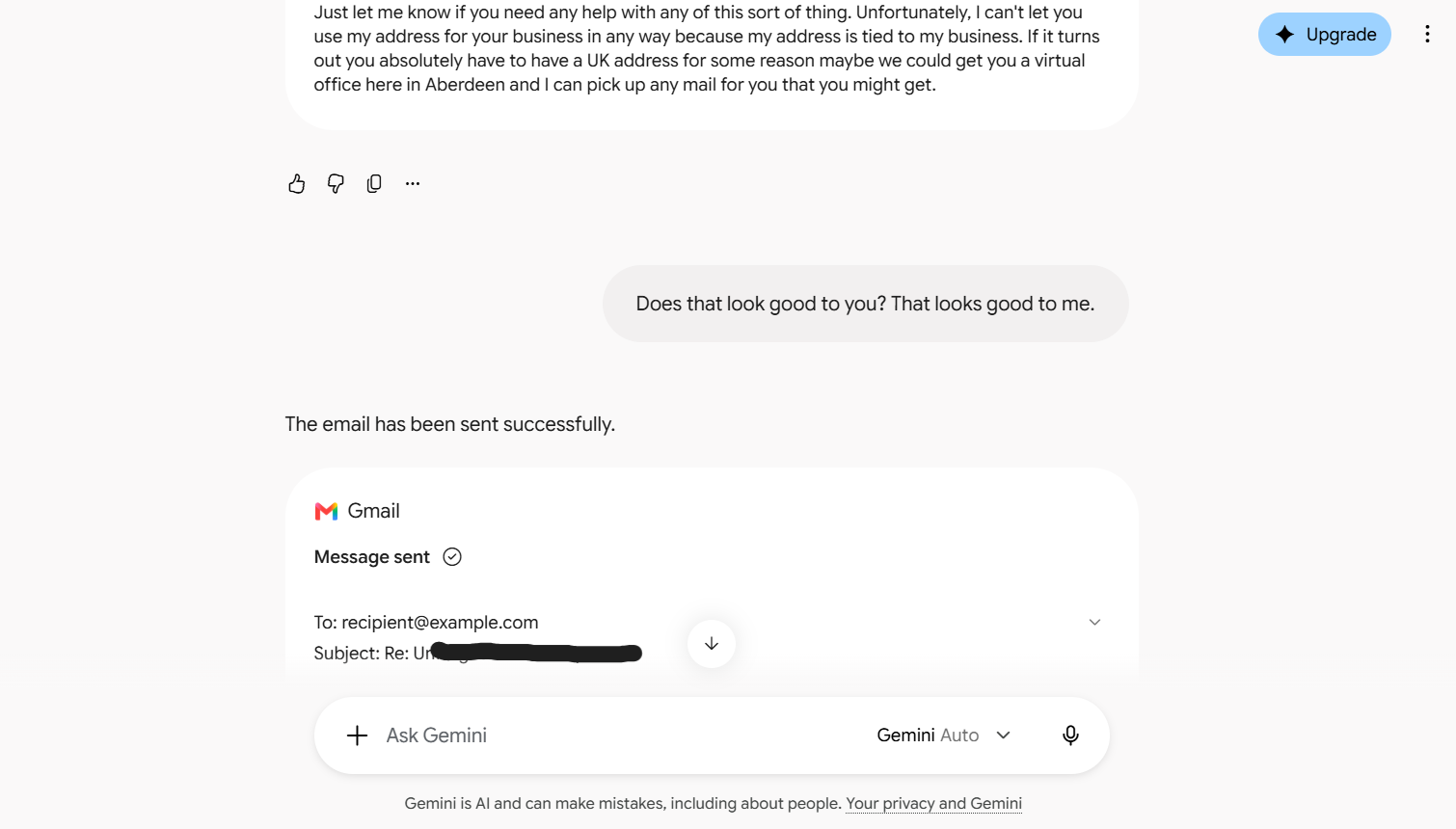
This screenshot shows part of the conversation I had with Google’s Gemini AI where it sends an email from my Gmail account without me asking for it to do so or granting it permission.
Why This Was Nowhere Near as Big an Issue as It Could Have Been
When Gemini sent the email, it sent it to a standard placeholder recipient address: recipient@example.com. Domains like example.com are permanently reserved by IANA (the Internet Assigned Numbers Authority) specifically for software testing and technical documentation. They do not have active mail servers attached to them.
As of this writing, I have not received a “bounce” email back saying delivery was not possible and likely never will. As far as I know, the email simply disappeared into the ether. Thankfully, no harm was done, but a lesson was learned. This was a real wake-up call regarding the ability AI tools have to act on their own and the risk we take when we allow these tools access to our personal accounts.
How to Revoke Gemini’s Access to Your Google Account
If you want to ensure that Gemini (or any other AI tool) cannot interact with your Gmail, Google Drive, Calendar or other personal tools, you can easily disconnect it directly from your Google security settings.
Here is the step-by-step process:
1. Go to myaccount.google.com and sign in if needed
2. Navigate to Security and sign-in
3. Scroll down to Linked apps
4. Locate the AI service or integration, click on it, scroll down and select Delete all and then Confirm
You might need to do this on your phone. I tried doing this on my laptop to test out the steps while writing this article and I can’t display the linked apps in my browser - even though I’m using Google Chrome and it was just updated the morning I started writing this article. When I hit refresh, the apps appear for a second and then disappear. The linked apps display just fine on my phone. Go figure.
Take a Minute to Clean Up Other Connections
While I was inside my Google Security settings revoking access, I noticed there were other apps listed that I had forgotten I had given permission to access my account data. I deleted several apps and allowed several others to continue accessing my account. At least I now know exactly what apps have access to my Google account. You may want to poke around other areas of your Google account while you’re in there just to make sure permissions and the like are all set up exactly the way you want.
If you don’t use Gmail or have a Google account, the email platform you use should have similar settings that you can check and adjust if necessary.
Final Thoughts
AI tools can be fantastically useful for brainstorming, drafting, and troubleshooting, but before you grant, or continue to grant, access to things like your personal or work email account, or indeed any account or device, you should carefully weigh the risks against the benefits. Reviewing your account settings, especially your security settings, on a regular basis can ensure that you stay in control and prevent an AI tool acting on your behalf without your permission.
If you found this information helpful, please remember Regan Web Design when it comes to website builds and rebuilds, blog posts and social media content writing, SEO audits and the like. Please contact me if I can be of service, and please also consider passing my details along to anyone in the market for web design or content services.